Tyrian mods: ships, weapons, enemies and levels
A mod is a folder: a mod.json that describes what you add or change, plus optional PNG sprites and level files. No recompiling, no ID numbers to pick.
On this page
What a Tyrian mod can change
Everything below is plain data in mod.json and PNG files. The game reloads mods on the spot.
Weapons
New front and rear guns with their own power levels, shot patterns, damage and sprites, or copies of original weapons. Shots can pierce enemies or home in on them.
Ships, sidekicks, shields, specials
Written from scratch or copied from an original item, sold in the shop or put in the starting loadout.
Enemies
Change any original enemy, or create new ones with data-driven flight paths, player tracking and up to four turrets.
Enemy weapons
Give your enemies their own fire patterns, with the same fields as a player weapon's power level.
Level encounters
Add enemy waves to an original level, or replace its whole event list. Events are written by name.
Sprites
Replace any named original sprite, add new ones, or recolour every image of a mod with a single tint.
Mod packs included with the game
Five packs ship in the game's mods/ folder, all off until you turn them on in Setup → Mods. Their ships and weapons are drawn in the original Tyrian style, sold in every shop and balanced against the original items of the same price. The five can be on together.
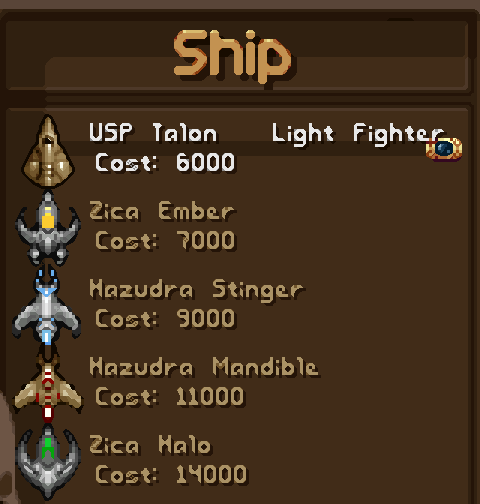
Alien Ship Pack
Ships of Tyrian's two alien races, the Hazudra and the Zica, from a light scout to a swarm flagship.
8 ships · 5 banking poses each
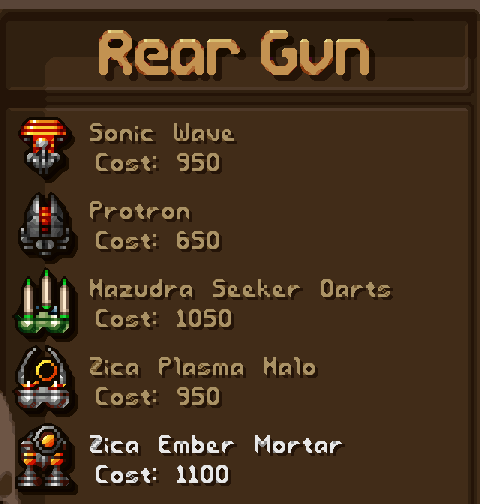
Alien Weapon Pack
Hazudra and Zica guns: piercing thermal lances, a crescent fan, homing darts, plasma rings and a lobbed mortar.
6 weapons · 11 power levels
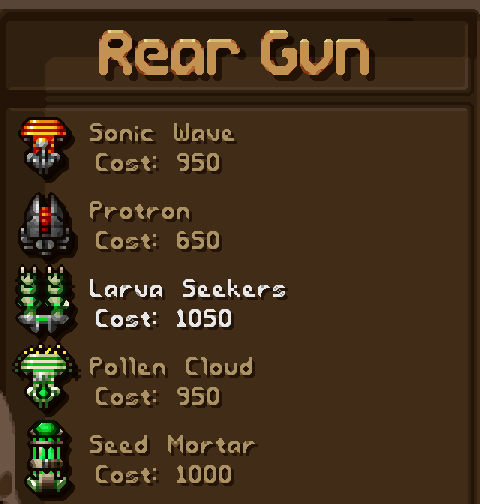
Bio Weapons Pack
Living guns in glowing green: spore bursts, acid globs, piercing thorns, homing larvae, pollen and seeds.
6 weapons · 11 power levels
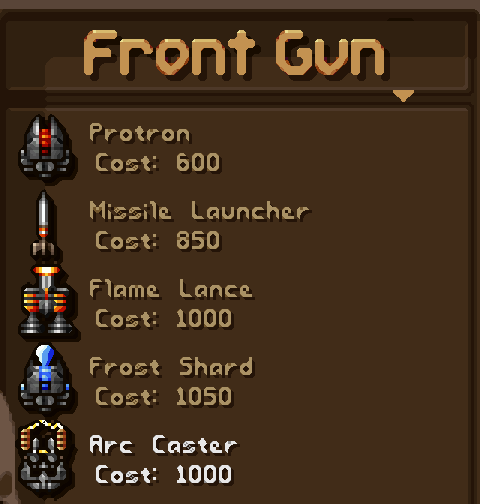
Elements Weapon Pack
Fire, ice and lightning in front; earth, acid and wind at the rear. Ice shots freeze enemies and stop their guns.
6 weapons · 11 power levels
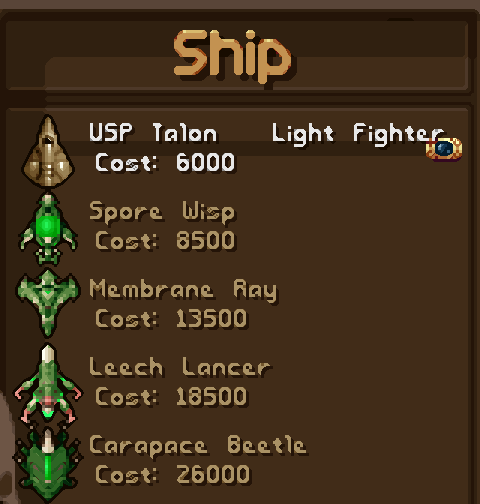
Bio Ships Pack
Bio-organic alien ships with carapaces, membrane wings and glowing spore sacs, up to the Hive Mother.
6 ships · 5 banking poses each
One folder, everything named
The weapons, ships, enemies and sprites a mod creates are named by their author, and the original content it copies or changes is cited by its name too, such as "base": "Vulcan Cannon". The engine assigns every internal slot itself: you never pick an ID number, and two mods never fight over one.
my_mod/
  mod.json              required: "format_version": 1 and "name"
  README.md             optional: shown in Setup → Mods (1 KiB at most)
  levels/ep1_09.json    optional: events of a level
  sprites/shots/*.png   optional: images, cited by their file name
A real mod.json
This is the Alien Pack reference example, comments removed. It is not in the game package: it lives in rewrite/ of the repository. It adds a ship and four weapons copied from original ones, tints every PNG of the mod green, and sets the starting loadout of a new game:
{
  "$schema": "../../mod.schema.json",
  "format_version": 1,
  "name":        "Alien Pack",
  "author":      "OpenTyrian2000 Team",
  "version":     "3.0",
  "description": "Green alien fleet — 4 stock weapons re-skinned via engine tint.",
  "tint":        "green",
  "enabled":     false,
  "ships": [
    { "name": "Xeno Vanguard", "base": "Gencore II", "ship_sprite": "xeno_vanguard", "always_available": true }
  ],
  "weapons": [
    { "name": "Alien Vulcan Cannon", "base": "Vulcan Cannon",          "always_available": true },
    { "name": "Alien Mega Cannon",   "base": "Mega Cannon",            "always_available": true },
    { "name": "Alien Bio Spreader",  "base": "Sonic Wave",             "always_available": true },
    { "name": "Alien Guided Orbs",   "base": "Heavy Missile Launcher", "always_available": true }
  ],
  "starter": {
    "ship":         "Xeno Vanguard",
    "front_weapon": "Alien Vulcan Cannon",
    "rear_weapon":  "Alien Guided Orbs"
  }
}
Next to it, the mod's sprites/ folder holds the ship image (sprites/), shop icons and shots; "tint" recolours all of them when the mod loads. "$schema" is optional: it points your editor at the published JSON schema for completion and live errors. Every unknown key is reported as an error, so a typo never goes unnoticed.
Install a mod from a .zip
- In the game, open Setup → Mods and pick Install a mod (.zip), or drop the
.zipon the game window while that menu is shown. - The mod is copied to your
mods/folder and appears in the list. Each mod is marked ON, OFF or ERR. - Enter turns the selected mod on or off; Esc applies the change, reloads the mods at once and returns to the title.
The archive must hold mod.json at its root or inside a single top-level folder. An archive that would write outside its folder, or a mod whose folder already exists, is refused with the reason on the line: to update a mod, delete its folder first. Open mods folder opens that folder in your file manager, so you can also copy mod folders there by hand.
A broken mod shows its error on its line instead of crashing the game. Limits keep untrusted files safe: at most 32 mods, PNG files of at most 4 MiB and 2048 pixels per side, and a few more listed in the limits and troubleshooting page.
The level editor and Play from here
The repository includes a level editor built into the Godot editor. Its Tyrian dock lets you pick a start row on the level map, Add an enemy here, Export to the mod, Build the .zip package to share, and Play from here, which starts the level fast-forwarded to the row you chose, so you can test an encounter in seconds.

The editor works from the source code: you build the game first (see docs/build.md), then open the Godot project. You do not need it to make a mod: level events can also be written by hand in levels/epN_NN.json. This example, from the modding guide, adds two enemies to the first level of episode 1:
{ "episode": 1, "lvl_file_num": 9,
  "add_events": [ { "time": 300, "spawn": "my_drone", "x": 130 },
                  { "time": 300, "spawn": "tech_corridor_32", "x": "random", "link": 3 } ] }
add_events inserts events into the original list, events replaces it, and random_enemies replaces the level's random enemies. time is the scroll position shown by the editor. Every event type is listed on the Level events page.
Where to start
- Copy the template
rewrite/mod_template/from the repository into yourmods/folder, rename it and edit itsmod.json. - Open the five mod packs in the game's
mods/folder (also inrewrite/mods/of the repository): two ship packs with five drawn poses per ship, three weapon packs with eleven power levels and their own shot sprites. - Study the reference examples in
rewrite/mods/_retired/of the repository (not in the game package): Alien Pack (copied items, a tint and a starting loadout), Example Behaviors (a new enemy weapon and a zig-zagging drone with a turret, added to a level) and Nova Weapons (three weapons written from scratch). - Follow the tutorial: your first level in about fifteen minutes, from adding an enemy to sharing the
.zip.
The modding reference in the wiki
Modding overview
How mods are read, installed, enabled and checked.
OPEN →mod.json and items
Weapons, power levels, projectiles, ships, sidekicks, shields, specials, shop and starter.
OPEN →Sprites
Folders, names, enemy images and tint.
OPEN →Enemies and behaviors
New enemies, enemy weapons, paths, tracking and turrets.
OPEN →Level events
Add or replace the enemy waves of a level.
OPEN →Your first level
The editor tutorial, step by step.
OPEN →Mod packs
The five packs shipped with the game: every ship and weapon with its stats.
OPEN →Game data formats
The Tyrian 2000 files the game reads.
OPEN →Limits and troubleshooting
Common errors and limits.
OPEN →Questions, bugs, ideas?
Tell us what you think of the Enhanced Edition: we read every message.
Write to us